
Betist App and Mobile Version
Browser, home-screen shortcut and Android APK compared: install steps, safety checks and where to look when something goes wrong.
18+ · Gamble responsibly
Searching for the Betist app usually begins in a store and ends in confusion, because neither Google Play nor the App Store lists one for this brand. That is why the page opens with the plain answer: three routes exist for a phone, namely the browser, a home-screen shortcut (PWA) and an Android APK file. Below, each route is explained with its install steps, what it is good for and what can go wrong.
This text is written for adults aged 18 and over. Menu names differ by phone make and system version; if your screen shows other wording, pick the closest meaning. If gambling stops being fun, free and confidential help exists through national helplines. Last updated 12 November 2026.
Do You Need the Betist App?
For most people a separate application is unnecessary, whether the handset is a Samsung, a Xiaomi or an iPhone. The site is built for small screens: coupon, cashier, live video and the game list all open in the browser. What changes on a phone is the layout, with the menus gathered into a bottom bar. The balance, profile and bet history are identical on every device, so a coupon placed on the phone appears on the laptop as well.
One rule helps choose: the less you install, the smaller the risk. A browser installs nothing, a PWA only places an icon and an APK puts a file on the phone. The sensible order is therefore browser first, shortcut second and APK last, only if you have a concrete reason. Older handsets with little memory may stutter on heavy slot animation, in which case lowering the graphics quality or choosing lighter games solves it.
- Occasional users: the browser is enough.
- Daily users save time with a home-screen shortcut.
- Android owners who want notifications and full screen can consider the APK.
- On iPhone the only extra option is the PWA.
Notifications behave differently across the routes: a browser shows none, a shortcut can show some, and an APK sends them freely. Promotional pushes for every campaign can add betting pressure, so switch off those you do not need in the phone settings. Keep the browser up to date as well, since old versions bring security and compatibility problems.
Mobile Browser vs PWA App
With a browser the address bar stays visible, so checking the domain is easy. A PWA (progressive web app) places the same site on the home screen and opens it full screen without an address bar when the icon is tapped. It looks like an app, yet what runs behind it is still the website, and updates come along with the page.
| Feature | Browser | PWA | Android APK |
|---|---|---|---|
| Install | None | Added from menu | File download and install |
| Address bar | Visible | Hidden | Hidden |
| Updates | Automatic | Automatic | Often manual |
| Risk level | Low | Low | Medium |
| iPhone support | Yes | Yes | No |
Its one weakness is the hidden address bar. Several shortcuts on the same screen add to the confusion, so keep one and name it plainly with just the brand. Copies often use the same icon, and the difference shows only in the address that opens. Confirm the domain before adding the shortcut, and when the address changes delete the old icon and add a new one. Many people who search for the Betist download are really after this shortcut, which gives the same convenience without any extra file.
Mobile Data and Battery Use
Browsing pages and spinning slots use little data, whereas an hour of live video uses clearly more. Lowering the stream quality cuts it, and anyone on a limited plan should watch on Wi-Fi. Animated games combined with bright screens also drain the battery fast. Betist ios users have no file to install, only the Safari shortcut described below.
- Dim the screen and keep the auto-lock short.
- Close unused tabs and background apps.
- Charge during long sessions.
- Use lower stream quality to save data.
Long sessions strain the budget as much as the battery. The phone’s screen-time reminder and a fixed stop hour are healthy habits. Betist mobile pages are laid out for thumbs, with the cashier and coupon buttons within easy reach.
Mobile Troubleshooting
Whether the problem concerns an iOS shortcut or an Android file, including trouble after a Betist apk download, most mobile faults come from the connection, the cache or a wrong address. The table lists the usual cases with their fixes.
| Symptom | Likely cause | Fix |
|---|---|---|
| Page will not open | Address changed or access restricted | Verify the address on the official channel |
| APK will not install | Permission off or old Android | Enable permission; otherwise use the PWA |
| App freezes | Full storage or cache | Clear cache and restart |
| Stream stutters | Weak connection | Switch to Wi-Fi, lower quality |
| Shortcut will not open | Old address | Delete and add again |
If none of it works, write to live chat with the phone model, the Android or iOS version and a screenshot of the error. Pages that rank for a Betist app download rarely give these details; the brand’s own support is the dependable route.
APK Safety and Permissions
An APK is the installation package of an Android app. It skips store review, so nobody vouches for its contents and the risk rests with the user. Searches for the Betist apk can lead to third-party sites offering old, modified or harmful versions, so take the file only from the link announced on the brand’s verified channel. In everyday speech the Betist app mostly means the home-screen shortcut rather than a store application.
Before downloading, check three things: does the file name and size match the announcement, does the link open over https, and did the download trigger an unexpected redirect? Grant notification permission deliberately after installing. A version that asks for contacts, SMS or accessibility services is requesting rights that have nothing to do with betting and should not be installed. An app download offered in a social-media post deserves suspicion.
The unknown-sources permission should stay on only during installation and be switched off straight afterwards. If the phone has a security scanner, scan the file before installing. This page gives no direct APK link, because addresses change and old links can turn into fake pages over time.
Fast Deposits from Your Phone
The cashier opens from a button in the bottom menu. Choose a method, enter the amount and confirm. Bank transfer, card, e-wallet and crypto options follow the list shown in the account, which can change. Minimum deposits usually sit between 50 and €100, and the welcome offer needs €100. Keep two-step verification on and never store the password in phone notes. The funds normally appear within minutes, though a bank transfer can take longer.
The most common slip on a phone is a mistyped amount or account detail on the touch keyboard. Read the amount, method and any fee once more on the confirmation screen, use only methods registered in your own name, and avoid shared Wi-Fi at the cashier; mobile data is safer. Mobile access to the cashier takes two taps, but check the screen-lock timeout before leaving a session open.
Betist Android Installation Steps
Installing on Android takes a few minutes, and the first question is where the file comes from. Allow unknown sources temporarily for your browser, download the file, start the installation and disable the permission when done. The file described this way is an APK, and the steps below work on most phones.
- 01
Verify the current address
Compare the domain on the verified Telegram channel and X profile with the address bar, letter by letter.
- 02
Download the APK
Use only the download button on the verified address, and make sure the size matches the announcement.
- 03
Allow the install
In settings, allow unknown sources for your browser only.
- 04
Start the installation
Open the file from Downloads and confirm Install.
- 05
Switch the permission off
Go back to settings, turn the permission off and launch the app.
Menu names differ: some phones call the permission “Install unknown apps”, others list it under Security. A file manager may show the download in another folder. If the app will not open after installing, check free storage, the Android version and the connection; if nothing changes, delete the file and download it again from the verified link. Betist download requests are best answered with a shortcut, because it installs nothing and updates itself.
Betist on iOS (iPhone) Guide
An APK does not run on iPhone, so the extra option for iOS is the PWA. Open the current address in Safari, tap the share icon, choose “Add to Home Screen” and confirm the name. An icon appears within seconds and the site opens full screen.
- 01
Open Safari
Open the verified address in Safari; other browsers may place the option elsewhere.
- 02
Tap Share
Use the share button at the bottom or top of the screen.
- 03
Choose Add to Home Screen
Scroll the list, pick the option and confirm the name.
- 04
Open the shortcut
Tap the new icon; the site opens full screen.
A store listing that carries the brand name is not official and should not be installed. Requests for a configuration profile or an enterprise certificate are not part of a normal installation either. If the shortcut fails, refresh the page in Safari, clear cookies, then remove the icon and add it again. For Betist ios the rule is the same as for Android: verify the address, install nothing extra. The safest Betist apk download is the one linked from the verified announcement, never a copy found through search.
Mobile Game Interface Review
Betist mobile is the most used version of the site, and the layout reflects it. The top shows the logo and balance, with category tabs and game cards below. The bottom menu jumps to home, games, coupon, cashier and account in one tap. Card badges separate new, popular and demo-enabled titles, and the provider name sits under each card. Slots feel better upright and live tables in landscape; the layout adapts on its own. Store-style pages in results for a Betist app download are mostly unofficial.
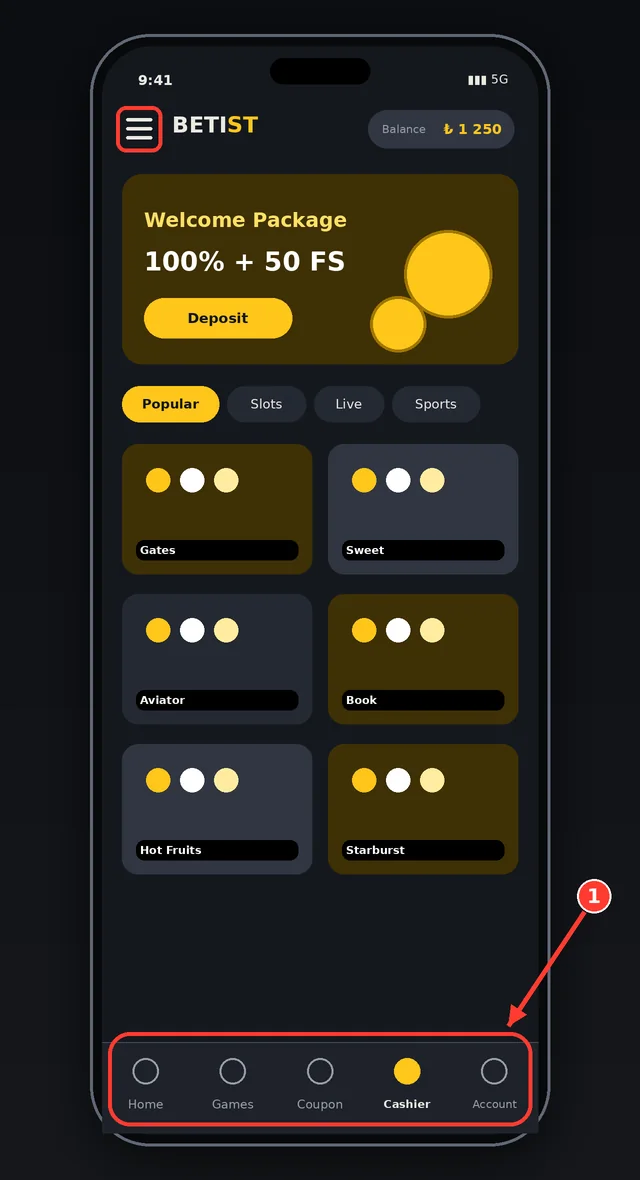
The phone screen shows the logo and balance on top, category tabs and game cards below. The framed area is the bottom menu, and the cashier and coupon buttons are the two most used shortcuts.
Tabs scroll sideways. A search box and a provider filter shorten the hunt through the long list, and starred games gather in a separate list.
An installed APK changes the frame around the site, not its content. Filters, favourites and the recently played list match the desktop. Slots with a demo mode open on the phone too, so rules can be tried without a deposit. Accidental taps on bet boxes are easy on a small screen, so set the stake before entering a game and use quick spin only on purpose.
Live Betting on Mobile
Live betting opens as a match list with scores and market tabs, and the coupon panel slides up from the bottom while odds change instantly. A symbol marks matches with a stream, which can go full screen. Android and iPhone behave the same here, and when the signal weakens the picture quality drops automatically.
Smoothness depends on the connection. Switching between Wi-Fi and mobile data can cut the page, so after a drop check the bet history to see whether a coupon was accepted. Battery-saver mode may freeze the page in the background, so turn it off during live betting. People who use the shortcut instead of a download wait less, because the page loads faster from cache.
FAQ
Is there a Betist app?
There is no listing on Google Play or the App Store. You can use the mobile browser, a PWA shortcut on the home screen, or an APK file for Android. For most people the browser or shortcut is enough, and the APK should come only from the verified official channel.
Where can I download the Betist APK?
Only from the link announced on the brand’s verified Telegram channel or official site. Third-party sites may offer old or harmful versions. The size should match the announcement, and the unknown-sources permission should be switched off after installing. This is general information; personal situations are decided by the platform's current rules and the support team's reply.
How do I use Betist on iPhone?
An APK does not run on iPhone. Open the verified address in Safari, tap Share, choose Add to Home Screen and the site starts full screen like an app. A store application with the brand name is not official and should not be installed.
Are all games available on mobile?
Most slots and live tables open on a phone; a few older titles may remain desktop-only. Demo mode, filters and live video exist on mobile too. If a game will not open, clear the cache and check the connection. Terms can change over time, so the wording on the official page and in live chat always takes precedence.
On a phone the safest path is to install nothing and use the browser or the home-screen shortcut. Consider an APK only for a concrete reason such as notifications, and take it from a verified channel. Betist android and iPhone users follow one rule: confirm the address from the announcement channel, keep permissions limited and plan the session length on the phone as well.
If play gets out of hand, the responsible gambling page and national helplines offer free guidance. The scoring criteria are on the methodology page.
In short, the right address, carefully read terms and limits set in advance are the foundation of a smooth experience. Details can change, so before any important decision it is enough to confirm through the official channels and, when needed, to write to live chat.